About Timesheet Pro: Hours Tracker
A clean and efficient app to log and store your worked hours, helping to ensure you never forget a day's hours or misplace a physical timesheet again. Customise the app to match your job, by tracking tasks such as...
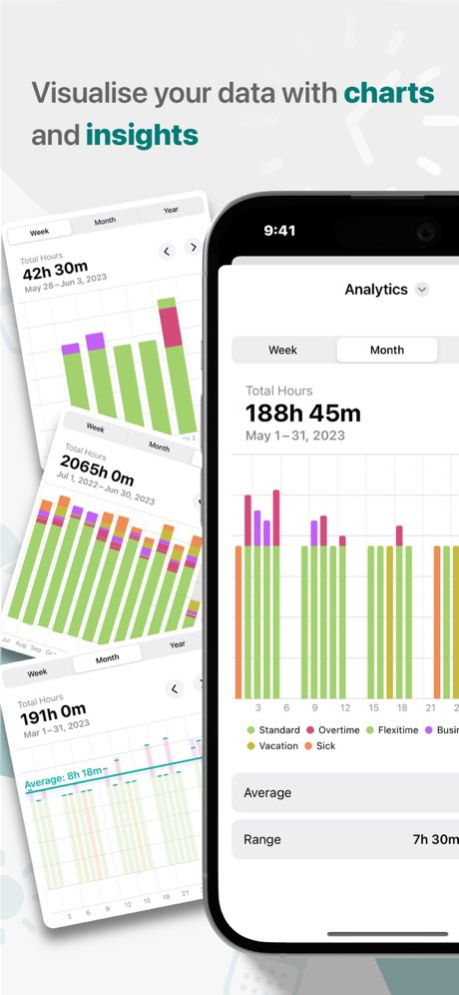
A clean and efficient app to log and store your worked hours, helping to ensure you never forget a day's hours or misplace a physical timesheet again. Customise the app to match your job, by tracking tasks such as overtime, flexitime, vacation and more. It only takes a few seconds every day to log your hours, and your auto-generated timesheets, exports, trends and more will be available whenever you need them. Key features of Timesheet Pro: . Weekly, monthly and yearly breakdown reports . Create and share PDF and CSV exports . iCloud Sync your data across your devices . See quick information with Home and Lock Screen Widgets . Track limits such as vacation and sickness . Automatically generated charts, trends and statistics . Create custom schedules, categories, jobs and more . Notifications and reminders (optional) Getting started is easy, and logging your hours will be even easier. Timesheet Pro is here to help you. The app includes illustrations by storyset, sourced from Freepiks
Version History TimesheetPro now supports iOS26! Check out the Liquid Glass effects and updated App Icon. 2.0.0 09/20/2025 New 'Schedule' widget added to view the entire month & better support for Home Screen tint modes for all widgets 1.8.0 04/29/2025 Updates to the small widget axis labels to prevent them overlapping and general app improvements. 1.7.1 04/27/2025 Added support for iOS17 features including dark and tinted icons. 1.7.0 11/07/2024 Fixes issue on iOS 18 devices with changing between the month and year timesheet views, and issues with scrolling on several views. 1.6.1 10/02/2024 iCloud sync is now available to automatically keep your timesheets updated across all your iOS devices. The app now supports dynamic font size for accessibility and further timesheet breakdowns for each category in the Timesheet view. 1.6.0 01/01/2024 The timesheet interface has been given a totally new look - which is more interactive and quicker for you to move between months, years and custom ranges. We've also made some performance updates to make the app run smoother. 1.5.0 11/20/2023 iPadOS 17 updates including support for Lock Screen widgets & Standby Mode. Additional optimisations and bug fixes. 1.4.1 09/24/2023 Add widgets in new locations and more iOS17 optimisations. Fixed time picker bug when using iOS17. 1.4.0 09/23/2023 Create custom date ranges for timesheet exports and CSV is now supported! Additional lock screen widgets have also been added for schedules and charts. 1.3.0 06/22/2023 Added option to snap to weeks, months and years in chart view and new pie chart added to the monthly overview. Fixed issue where standard time was incorrect when manually entering flexitime and archived categories no longer appear when logging hours. Plus general performance improvements. 1.2.4 06/04/2023 New onboard flow to help users setup and customise the app as well as improved custom colours that now automatically adjust in dark mode. 1.2.3 06/01/2023 New allowances feature added to track entitlements such as annual leave and overtime limits. Plus general bug fixes & UI improvements. 1.2.2 05/03/2023 Flexitime is now built directly into the app, allowing you to add and remove hours from your flexi pot whenever you need to. This is made even quicker with the addition of the Flexitime Auto-Calculate feature - doing the hard calculations for you. Users will also have more options and customisability when adding hours, and better visualisations including Home Screen widgets! Enjoy the new features + bug fixes. 1.2.1 04/23/2023 Fixed bug adding hours using basic editor 1.1.1 01/26/2023 New features! • Additional trends • Notifications • PDF Exports • Archive Jobs & Categories Small Improvements • Icons added to calendar & entry view • Timesheets moved to its own tab • Help screen added to rates 1.1.0 01/26/2023 1.0 12/28/2022
Previous Versions
Here you can find the changelog of Timesheet Pro: Hours Tracker since it was posted on our website on 2025-05-26 10:06:36.
The latest version is 2.0.0 and it was updated on 2026-10-07 02:29:50. See below the changes in each version.
Timesheet Pro: Hours Tracker version 2.0.0
Updated At: 2026-10-07
Changes: Version History TimesheetPro now supports iOS26! Check out the Liquid Glass effects and updated App Icon. 2.0.0 09/20/2025 New 'Schedule' widget added to view the entire month & better support for Home Screen tint modes for all widgets 1.8.0 04/29/2025 Updates to the small widget axis labels to prevent them overlapping and general app improvements. 1.7.1 04/27/2025 Added support for iOS17 features including dark and tinted icons. 1.7.0 11/07/2024 Fixes issue on iOS 18 devices with changing between the month and year timesheet views, and issues with scrolling on several views. 1.6.1 10/02/2024 iCloud sync is now available to automatically keep your timesheets updated across all your iOS devices.
The app now supports dynamic font size for accessibility and further timesheet breakdowns for each category in the Timesheet view. 1.6.0 01/01/2024 The timesheet interface has been given a totally new look - which is more interactive and quicker for you to move between months, years and custom ranges. We've also made some performance updates to make the app run smoother. 1.5.0 11/20/2023 iPadOS 17 updates including support for Lock Screen widgets & Standby Mode. Additional optimisations and bug fixes. 1.4.1 09/24/2023 Add widgets in new locations and more iOS17 optimisations. Fixed time picker bug when using iOS17. 1.4.0 09/23/2023 Create custom date ranges for timesheet exports and CSV is now supported!
Additional lock screen widgets have also been added for schedules and charts. 1.3.0 06/22/2023 Added option to snap to weeks, months and years in chart view and new pie chart added to the monthly overview. Fixed issue where standard time was incorrect when manually entering flexitime and archived categories no longer appear when logging hours. Plus general performance improvements. 1.2.4 06/04/2023 New onboard flow to help users setup and customise the app as well as improved custom colours that now automatically adjust in dark mode. 1.2.3 06/01/2023 New allowances feature added to track entitlements such as annual leave and overtime limits. Plus general bug fixes & UI improvements. 1.2.2 05/03/2023 Flexitime is now built directly into the app, allowing you to add and remove hours from your flexi pot whenever you need to. This is made even quicker with the addition of the Flexitime Auto-Calculate feature - doing the hard calculations for you.
Users will also have more options and customisability when adding hours, and better visualisations including Home Screen widgets!
Enjoy the new features + bug fixes. 1.2.1 04/23/2023 Fixed bug adding hours using basic editor 1.1.1 01/26/2023 New features!
• Additional trends
• Notifications
• PDF Exports
• Archive Jobs & Categories
Small Improvements
• Icons added to calendar & entry view
• Timesheets moved to its own tab
• Help screen added to rates 1.1.0 01/26/2023 1.0 12/28/2022
Timesheet Pro: Hours Tracker version 2.0.0
Updated At: 2025-09-20
Changes: Sep 20, 2025
Version 2.0.0
TimesheetPro now supports iOS26! Check out the Liquid Glass effects and updated App Icon.
Timesheet Pro: Hours Tracker version 2.0.0
Updated At: 2025-09-20
Changes: TimesheetPro now supports iOS26! Check out the Liquid Glass effects and updated App Icon.
Timesheet Pro: Hours Tracker version 1.8.0
Updated At: 2025-04-29
Changes: Apr 29, 2025
Version 1.8.0
New 'Schedule' widget added to view the entire month & better support for Home Screen tint modes for all widgets
Disclaimer
Official App Store Link
We do not host Timesheet Pro: Hours Tracker on our servers. We did not scan it for viruses, adware, spyware or other type of malware. This app is hosted by Apple and passed their terms and conditions to be listed there. We recommend caution when installing it.
The App Store link for Timesheet Pro: Hours Tracker is provided to you by apps112.com without any warranties, representations or guarantees of any kind, so access it at your own risk.
If you have questions regarding this particular app contact the publisher directly. For questions about the functionalities of apps112.com contact us.